Docs / Agent skills
Fix production errors from your editor
The Patchly MCP server connects Claude Code or Cursor to the capture, issue, repair loop. Your agent can list open issues, read repair notes, draft fixes locally, and post patch comments without leaving the editor.
Generate an Agent API token
Go to Dashboard → Settings → Agent API Tokens and create a new token. Copy it immediately — it's only shown once.
Add the MCP server to Claude Code
Open (or create) ~/.claude/claude_desktop_config.json and add the Patchly server under mcpServers:
~/.claude/claude_desktop_config.json
{
  "mcpServers": {
    "patchly": {
      "command": "npx",
      "args": ["-y", "@patchly/mcp"],
      "env": {
        "PATCHLY_API_TOKEN": "pat_your_token_here"
      }
    }
  }
}
Replace pat_your_token_here with the token you just generated. Restart Claude Code after saving.
Install the Patchly skill
Add the Patchly workflow skill so your agent knows when and how to use the MCP tools:
terminal
claude skill add https://patchly.cc/patchly-skill.mdThis downloads the skill to your project's .claude/skills/ directory. The skill tells Claude when to activate (on production error mentions) and walks it through capture context → fetch issue → draft repair → post comment → mark proposed.
Try it out
Open Claude Code and ask it to fix a production error:
Claude Code prompt
Fix the latest Patchly error in project proj_abc123Claude will call list_issues, fetch the repair note, draft a local fix, ask for your approval, then post the patch comment on the GitHub issue and mark it as proposed.
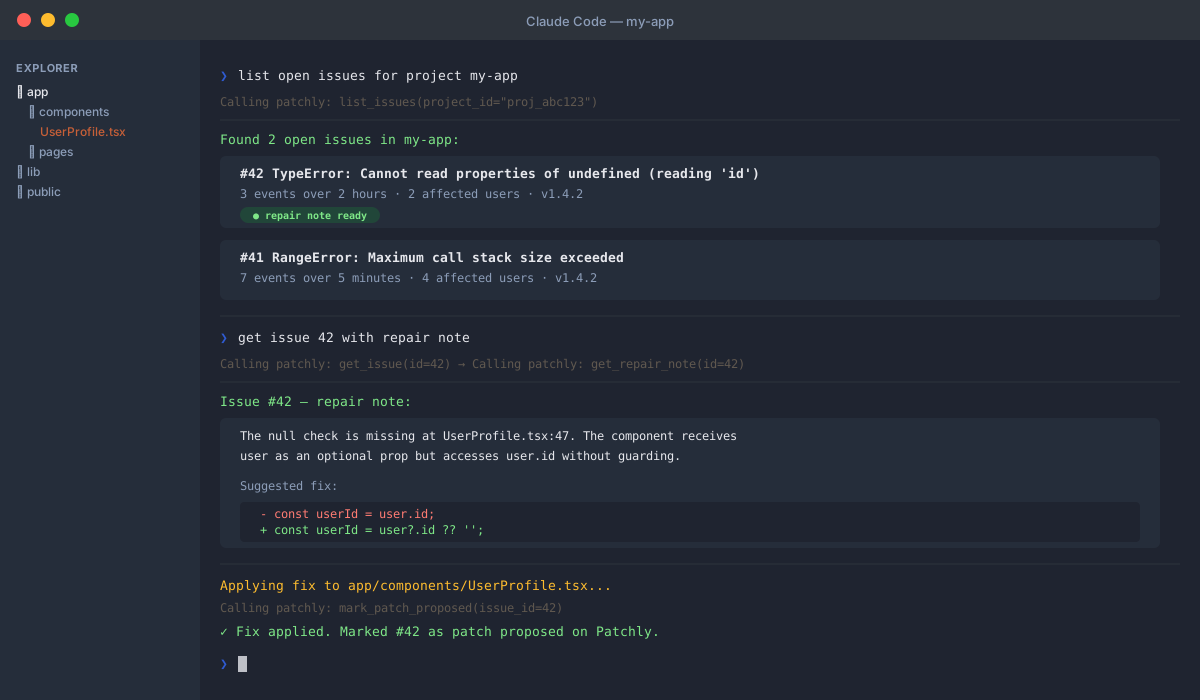
Claude Code reading a Patchly issue and applying the fix — all from the terminal.
What the agent does
- 1.Calls list_issues to find open errors for your project
- 2.Calls get_issue to read the full stack trace and AI repair note
- 3.Reads the affected source files in your editor
- 4.Drafts a local fix and shows you the diff
- 5.Applies the fix after you approve
- 6.Posts a patch comment on the linked GitHub issue via post_comment
- 7.Marks the issue as patch proposed via mark_patch_proposed
Editor support
| Editor | MCP support | Skill bundle | Status |
|---|---|---|---|
| Claude Code | Native | claude skill add | Full support |
| Cursor | Via MCP config | Manual CLAUDE.md | MCP config |
| Codex / Antigravity | Via MCP config | Manual | Documented |
Cursor setup
Cursor supports MCP servers via ~/.cursor/mcp.json (global) or .cursor/mcp.json (per-project). Add the same config block:
~/.cursor/mcp.json
{
  "mcpServers": {
    "patchly": {
      "command": "npx",
      "args": ["-y", "@patchly/mcp"],
      "env": {
        "PATCHLY_API_TOKEN": "pat_your_token_here"
      }
    }
  }
}
The skill bundle auto-install (claude skill add) is Claude Code-specific. For Cursor, copy the contents of patchly-skill.md into your project's CLAUDE.md or equivalent rules file.
Codex / Antigravity setup
Both Codex and Antigravity support MCP servers via a config file. Use the same JSON block above and consult your editor's MCP setup docs for the exact config path. Once the server is running, paste the skill workflow into your project's system prompt or rules file.
MCP tools reference
| Tool | Input | What it returns |
|---|---|---|
list_issues | project_id | Open issues — ID, title, event count, GitHub URL |
get_issue | issue_id | Full issue with stack trace, source context, repair note |
get_repair_note | issue_id | Just the AI-generated fix suggestion |
post_comment | issue_id, comment | GitHub comment URL |
mark_patch_proposed | issue_id | Confirmation (updates issue state in Patchly) |
No write tools that push code or open PRs — patches always land as GitHub issue comments so you stay in control.
Ready to connect?
Generate your Agent API token in the dashboard and the MCP server takes care of the rest.
Get API token →